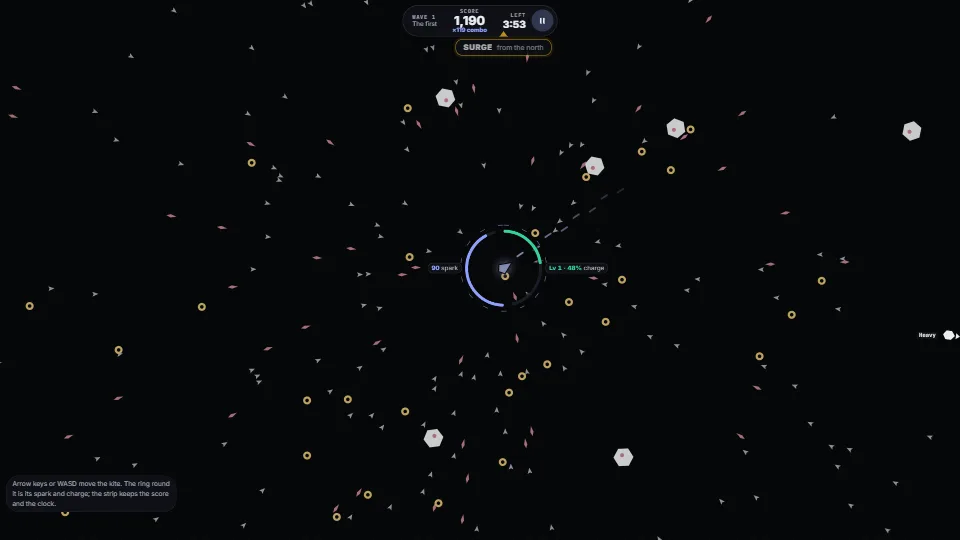
The live demo starts when it’s in view.Arrow keys or WASD move the kite · the buttons fire callouts · Esc or P pauses
A HUD for 2D action games that keeps the eyes on the action.
A HUD for 2D action games that keeps the eyes on the action: two meters ring the player (health and charge, say), a thin outer ring for a move that recharges, and only the score, the clock and the stage keep to a slim strip on the top edge. Callouts come one at a time, held long enough to read, and point at the edge their danger comes from; edge markers point at what is off screen. Every meter is a role="meter" with words in aria-valuetext, figures sit in reserved widths so nothing moves, a low meter says "low" in words as well as colour, and one polite live region joins what arrives together. DOM writes only when a value changes; the ring moves by transform alone.
Measured 21 November 2026 on RTX 4060 Laptop, 13th Gen Intel(R) Core(TM) i9-13900H, Chrome 157, 1920×1080 at 1×. 600 frames × 3 rounds, median kept (rounds ranged CPU 1.25–1.39 ms). What ran: Alone: the HUD over a plain field, its ring following a moving point every frame, meters, score and clock written as they change, a callout every few seconds. Phones: tiers are being measured next.
How steadily it runs on RTX 4060 Laptop · 13th Gen Intel(R) Core(TM) i9-13900H · reference
Typical frame ?
30.11 ms
1% low ?
30 fps
Varies by ?
±6.28 ms
All metricsRTX 4060 Laptop · 13th Gen Intel(R) Core(TM) i9-13900H · referenceHow long each frame took. Most frames sit in the tall bars; a long tail to the right is hitching.
Frames run on a 60 Hz timer (a page demo), so most frames take about one tick, 16.7 ms: the spread around it is what matters.
Frames
Median (p50) ?
30.11 ms
p95 ?
31.50 ms
p99 ?
33.05 ms
Slowest ?
34.36 ms
Mean ?
26.30 ms
Standard deviation ?
6.28 ms
1% low ?
30 fps
0.1% low ?
29 fps
Hitches ?
0 of 600
Over budget ?
0 of 600
Main thread
Long tasks ?
0
Long frames ?
0
Event-loop delay ?
0.3 / 2.8 / 4.8 ms
Input
Interactions ?
3
Input to paint ?
3.8 ms, worst 9.5
Longest handler ?
under 16 ms
Memory
JavaScript heap ?
35.1 → 33.6 MB
Growth ?
-1.52 MB
Browser
JavaScript a frame ?
1.61 ms
All tasks a frame ?
3.35 ms
Layout / style ?
0.05 / 0.28 ms
Main thread busy ?
13%
Garbage collection
Collections ?
6 (0 minor, 6 major)
Pauses ?
87.3 ms in all, longest 18.7
What it needs
Renders with
DOM and CSSPlain DOM and CSS: every current browser.
Your browser
Runs hereNo WebGPU needed
Depends on
NothingNo other packages
With an agent
install("game-hud")Your coding agent reads its pitfalls and installs it through the library’s MCP server. Set it up
What it’s for
Health, shield, ammo or charge for a top-down or twin-stick game
A score, a combo and a clock that never shift the layout
Wave and stage announcements that a screen reader hears once
Warnings that point at where the danger comes from
Markers for an enemy or objective off the screen’s edge
Pitfalls, in brief
Call at(x, y) with the player’s point in the HUD’s own CSS pixels every frame it moves, after your camera has placed it: from world to screen, then minus the HUD root’s offset.
set(), score() and timer() write to the DOM only when the shown value changes, so calling them every frame is fine.
The ring sits over the game.
Callouts are said through the live region by default; turn that off ({ say: false }) for one you say yourself, so it is not heard twice.
A low meter says "low" in its aria-valuetext and turns the bad colour; it also pulses while motion is on.
3 more in brief
The HUD does not know your Motion switch: pass reducedMotion at creation and call setReducedMotion(on) when it flips (effects-switchboard’s subscribe).
The pause button is a real button with data-no-stick (play-input’s floating stick ignores it).
An edge marker’s angle is from the player, in screen terms (y down): Math.atan2(enemy.y - player.y, enemy.x - player.x) once both are in screen space.
8 pitfalls in full, the hook-up guide, the module source and its tests come with the part.
Where it comes from
From another of the maker’s apps. Fully custom code.
One event, felt everywhere: impact({ x, y, mass }) makes every [data-body] element dip, rock and ring down on its shock mounts by its distance and its own…
One distance-field atlas holds a thin and a black cut of a typeface in its red and green channels, every glyph in the same fixed cell, so mixing the channels…
 UI & interactionNew
 UI & interactionNew
 UI & interactionNew
 UI & interactionNew