Every call, in order
An agent built the storm watch from the library alone, through this server. See what it asked for, in what order, and what we learned watching it.
How it was builtConnect your coding agent to the library’s MCP server. It finds parts for the job and the frame budget, reads every pitfall and the guide, installs the files marked with your licence, and checks the build. Planning is free, with no account.
Claude Code 2.1.325 with Claude Opus 5.5 got one brief and the library’s MCP server, nothing else. These are the calls it made, in order: 47 minutes in under a minute.
A storm watch for a small harbour town: the bay, live, is the background, with the weather now, the next 24 hours, warnings, the harbour's state and a 48-hour timeline over it.
The agentClaude Code 2.1.325 · Claude Opus 5.5, in an empty folder. Its only way into the library: this server.
First build done: 48 calls in 49 minutes. Then 2 review rounds, 58 minutes more
initialize · tools/listget_brief()get_kit("a weather desk for a harbour: a live GPU scene…")find_parts("sky with sun or moon by time of day and clo…")find_parts("ocean surface with waves whose height follo…")find_parts("rain and snow falling, slanted by wind, at…")find_parts("fog and mist that hides distance when visib…")find_parts("lights at night: lighthouse beam, harbour l…")find_parts("show each frame's cost part by part as slic…")get_part("physical-sky") · get_part("fft-ocean")get_part("rain-snow") · get_part("lit-height-fog")get_recipe("storm watch weather desk: a live raw-We…")get_playbook("performance", "page-shapes", "placement", …)get_part("capability-tiers") · get_part("day-timeline")get_part("quiet-charts") · get_part("kpi-tiles")get_part("chart-access") · get_part("effects-switchboard")install("atmos")install("physical-sky") · install("lit-height-fog") · …install("capability-tiers") · install("kpi-tiles") · …(no calls: building)check_look("atmos")(no calls: building)(no calls: building)check()check()check_look("atmos")Recorded on 17 November 2026: every call above comes from the server’s log of that run. The whole story, call by call.
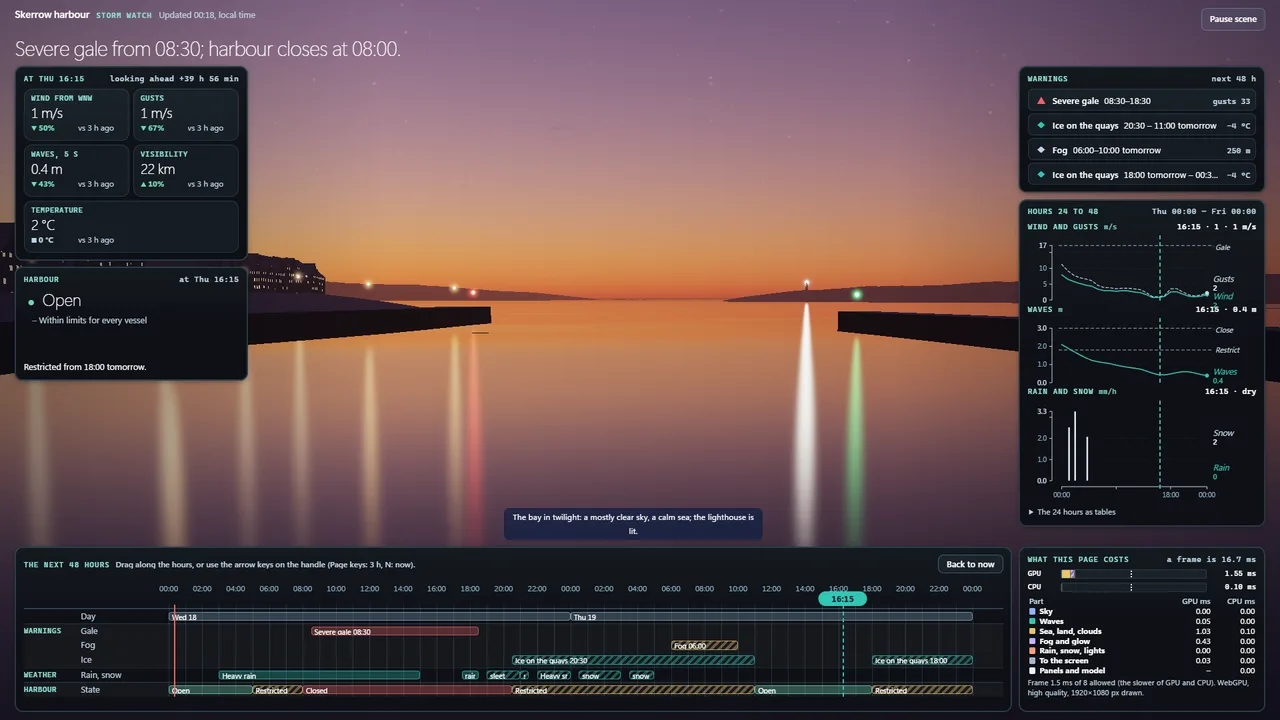 What it built: the storm watchOpen it live, full page
The server hands your agent the library’s rules first, then the tools below. It builds the glue and the new idea; the parts bring the hard-won details.
find_parts · get_kitFreeIt ranks parts for the job, the device and the milliseconds you can spare, or starts from a tested kit for the kind of build.
get_partFree titles · in full with a licenceBefore it writes a line, it reads every pitfall and the guide: the mistakes someone already made so yours doesn’t.
installWith a licenceThe part’s files, written unchanged into your project and marked with your licence, pinned to a version.
checkFreeThe checks to run on the build, and whether it may be called done, with what is missing.
The nine parts in that build, taken from the library, against the same nine built from nothing to the same standard. The left column comes from the recorded run; the right is our educated guess, with the assumptions below so you can judge it.
| For the nine parts | From the library | From scratch our guess |
|---|---|---|
| Agent time | 3 min 48 s to find, read and install themmeasured | 6 to 15 hours of prompting, running and fixing |
| Tokens | ≈ 0.3 millionfrom the size of what it read and wrote | ≈ 1.5 to 4 million |
| Known pitfalls | 97 read before the first linemeasured | Found one at a time in testing, or by your users |
| Frame cost | 2.3 msthe whole page, at worstmeasured | Unknown until you measure it |
Add the server and your agent can plan with the whole library. To install parts you own, add an access token from your account; it sees exactly what you own.
In a terminal, in your project:
claude mcp add --transport http feature-library https://featurelibrary.com/mcpWith your licence, to install the parts you own:
claude mcp add --transport http feature-library https://featurelibrary.com/mcp --header "Authorization: Bearer $FEATURE_STORE_TOKEN"Then ask it for what you are building. It calls get_brief first and follows the library’s rules. Make the token on your account page and keep it in your environment as FEATURE_STORE_TOKEN.
In .cursor/mcp.json:
{
  "mcpServers": {
    "feature-library": {
      "url": "https://featurelibrary.com/mcp"
    }
  }
}With your licence, to install the parts you own:
{
  "mcpServers": {
    "feature-library": {
      "url": "https://featurelibrary.com/mcp",
      "headers": {
        "Authorization": "Bearer ${env:FEATURE_STORE_TOKEN}"
      }
    }
  }
}Cursor reads the token from your environment; it never goes in the repository. Make the token on your account page and keep it in your environment as FEATURE_STORE_TOKEN.
In .vscode/mcp.json:
{
  "servers": {
    "feature-library": {
      "type": "http",
      "url": "https://featurelibrary.com/mcp"
    }
  }
}With your licence, to install the parts you own:
{
  "servers": {
    "feature-library": {
      "type": "http",
      "url": "https://featurelibrary.com/mcp",
      "headers": {
        "Authorization": "Bearer ${input:feature-library-token}"
      }
    }
  },
  "inputs": [
    {
      "type": "promptString",
      "id": "feature-library-token",
      "description": "Feature Library access token",
      "password": true
    }
  ]
}VS Code asks for the token once and keeps it out of the file. Make the token on your account page and keep it in your environment as FEATURE_STORE_TOKEN.
Any MCP client that speaks streamable HTTP:
URL:  https://featurelibrary.com/mcp
Type: streamable HTTP
Auth: none, to planWith your licence, to install the parts you own:
Header: Authorization: Bearer <your access token>Windsurf, Zed, Codex and others take the same URL and header in their own settings. Make the token on your account page and keep it in your environment as FEATURE_STORE_TOKEN.
This box calls the same server and the same free tool your agent uses. It matches words, so describe what the part has to do, the way the library would: “rain and snow”, “date picker”, “sortable table”.
An agent built the storm watch from the library alone, through this server. See what it asked for, in what order, and what we learned watching it.
How it was builtPlanning, kits, playbooks and every part’s pitfall titles cost nothing. Installing needs a licence for the part: from €9 at launch, in packs, or the whole library. Six starter parts are free.
See pricingThe same parts install with npm from your own feed, or download as files from your account. The catalogue is free to read as catalogue.json, and assistants can start from llms.txt.
Browse the parts