The live demo starts when it’s in view.Move through the water, press to drop a pebble, scroll
A stream over a visible bed, solved on the GPU every frame.
A stream over a visible bed, solved on the GPU every frame: a shallow-water height field stepped in WebGPU compute, with the page’s own headings and cards as stones the current parts round, sheds eddies behind and piles up against. It opens with a bore running down a nearly dry bed and settling into the stream; the pointer stirs it, a press drops a pebble, and scrolling pulls it along while the water stays on the page. Direction, force and depth are settings; three moods (a brook by day, a moonlit river, a lagoon) take any look’s colours and dials. It slows when left alone, rests off screen, holds a frame under reduced motion and keeps a drawn still without WebGPU. No textures, models or dependencies.
What it costs a frame
GPU
0.52 ms
CPU
<0.01 ms
02468101216.7 ms
GPU
0.52 ms
CPU, median
<0.01 ms
CPU, 95th pct
0.01 ms
Draw calls
0
Weight
Moderate
Measured 21 November 2026 on RTX 4060 Laptop, 13th Gen Intel(R) Core(TM) i9-13900H, Chrome 157, 1920×1080 at 1×. 600 frames × 3 rounds, median kept (rounds ranged GPU 0.49–0.54, CPU <0.01–<0.01 ms). What ran: The brook alone, full stage, already flowing: about 110,000 cells stepped about nine times a frame (two compute passes a step), banks on both sides, three rocks, and one full-screen draw. The number is the solve and the draw together. Phones: tiers are being measured next.
NVIDIA GeForce RTX 4060 Laptop GPU · 13th Gen Intel(R) Core(TM) i9-13900Hmeasuring tool · 21 November 2026
0.46
<0.01
0.01
Bars against one 16.7 ms frame. A browser-tab run is timed in a visible tab without the tool’s scripted input, so read it as close, not exact.
How steadily it runs on RTX 4060 Laptop · 13th Gen Intel(R) Core(TM) i9-13900H · reference
Typical frame ?
16.23 ms
1% low ?
57 fps
Varies by ?
±0.27 ms
All metricsRTX 4060 Laptop · 13th Gen Intel(R) Core(TM) i9-13900H · referenceHow long each frame took. Most frames sit in the tall bars; a long tail to the right is hitching.
Frames run on a 60 Hz timer (a page demo), so most frames take about one tick, 16.7 ms: the spread around it is what matters.
Frames
Median (p50) ?
16.23 ms
p95 ?
16.88 ms
p99 ?
17.38 ms
Slowest ?
17.75 ms
Mean ?
16.30 ms
Standard deviation ?
0.27 ms
1% low ?
57 fps
0.1% low ?
56 fps
Hitches ?
0 of 600
Over budget ?
0 of 600
Main thread
Long tasks ?
0
Long frames ?
0
Event-loop delay ?
0.1 / 0.9 / 1.2 ms
Input
Interactions ?
2
Input to paint ?
4.2 ms, worst 5.9
Longest handler ?
1.1 ms
Memory
JavaScript heap ?
42.2 → 40.7 MB
Growth ?
-1.56 MB
Browser
JavaScript a frame ?
3.88 ms
All tasks a frame ?
12.29 ms
Layout / style ?
0.00 / 0.00 ms
Main thread busy ?
75%
Garbage collection
Collections ?
20 (20 minor, 0 major)
Pauses ?
12.4 ms in all, longest 1.0
All metricsNVIDIA GeForce RTX 4060 Laptop GPU · 13th Gen Intel(R) Core(TM) i9-13900H · measuring toolHow long each frame took. Most frames sit in the tall bars; a long tail to the right is hitching.
Frames run on a 60 Hz timer (a page demo), so most frames take about one tick, 16.7 ms: the spread around it is what matters.
Frames
Median (p50) ?
16.25 ms
p95 ?
16.70 ms
p99 ?
17.09 ms
Slowest ?
20.52 ms
Mean ?
16.32 ms
Standard deviation ?
0.30 ms
1% low ?
55 fps
0.1% low ?
49 fps
Hitches ?
0 of 600
Over budget ?
0 of 600
Main thread
Long tasks ?
0
Long frames ?
0
Event-loop delay ?
0.1 / 0.8 / 1.2 ms
Input
Interactions ?
2
Input to paint ?
4.9 ms, worst 6.5
Longest handler ?
under 16 ms
Memory
JavaScript heap ?
37.2 → 36.9 MB
Growth ?
-0.33 MB
Browser
JavaScript a frame ?
3.25 ms
All tasks a frame ?
10.35 ms
Layout / style ?
0.00 / 0.00 ms
Main thread busy ?
64%
Garbage collection
Collections ?
19 (19 minor, 0 major)
Pauses ?
13.1 ms in all, longest 0.8
What it needs
Renders with
WebGPUNeeds WebGPU: current Chrome and Edge, Safari 26+, Firefox 141+ on Windows.
Your browser
Checking…Looking for WebGPU
Depends on
NothingNo other packages
With an agent
install("shallow-stream")Your coding agent reads its pitfalls and installs it through the library’s MCP server. Set it up
What it’s for
A hero or a whole landing page whose heading and cards stand in running water
A backdrop that answers scrolling: the current runs with the page
A river or a ford seen from above in a game, with rocks the player or the level moves
A product standing in a stream on a showcase page, the flow wrapping its footprint
A title or loading screen that opens with a surge of water
Still water (force 0) that only moves when touched: a pond, a basin, a puddle
Teaching wakes, bores, standing waves and eddies with stones people can move
Pitfalls, in brief
The demo needs WebGPU: the solve is compute into storage textures.
Stones are read from the page: mark headings data-stone (their glyphs become stones) and cards data-stone="box".
Thin strokes are not stones: a glyph stroke narrower than about one and a half cells (5 to 6 CSS px at the high tier) lets water through.
A height field holds one surface height a point: bores, wakes, standing waves and eddies are real, but nothing splashes, breaks or pours, and it is made to be seen from above.
The root must not clip or scroll by itself (no overflow hidden, auto or scroll on .ss-root): the water’s window is position: sticky inside it.
6 more in brief
Enclosed water (the bowl of an "o") cannot be reached by the current.
Text over the water is your page’s text: check --text against the water in each mood and theme, and keep small copy inside data-calm.
After a fast scroll, rows that have just come into the window start at rest, so wakes round newly arrived stones take a second or two to form.
Call restyle() after changing the look, the theme or the dials: colours and dials are read once, not every frame.
The solve runs about 500 steps a second at the high tier whatever the screen’s refresh rate, so its cost per frame is higher at 60 Hz than at 144 Hz.
One mount makes one WebGPU device.
11 pitfalls in full, the hook-up guide, the module source and its tests come with the part.
Where it comes from
Written for the library. Fully custom code.
Hannes Andersson: Feature Library effect and fictional demo.
Nuttapong Chentanez and Matthias Müller: The shape of the solver follows "Real-time Simulation of Large Bodies of Water with Small Scale Details" (2010): a staggered height field, velocity carried semi-Lagrangian, depth moved by upwind fluxes. Written out here from the paper’s description; no code taken.
waterstreamriverbrookshallow waterheight fieldfluidcomputewgslraw webgpustaggered gridwet and dryeddiesvortex sheddingwakeborefoamcausticsrefractionflow mapobstaclesdom + gputext as scenehero
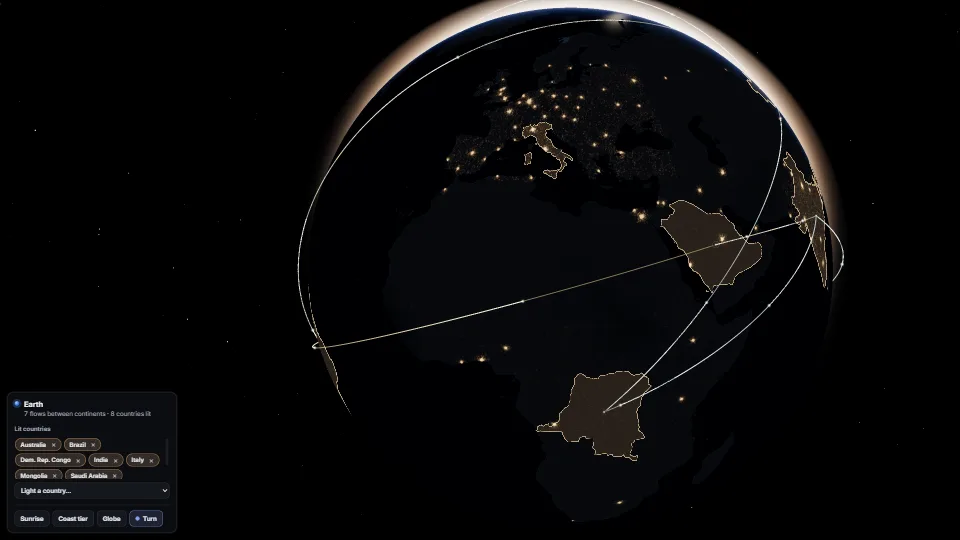
A planet to put a story on: land and sea from Natural Earth, the sun rising over the edge through an atmosphere, its glint on the water, city lights on the…
 SimulationNew

 SimulationNew
 SimulationNew
 SimulationNew