 Systems & tooling
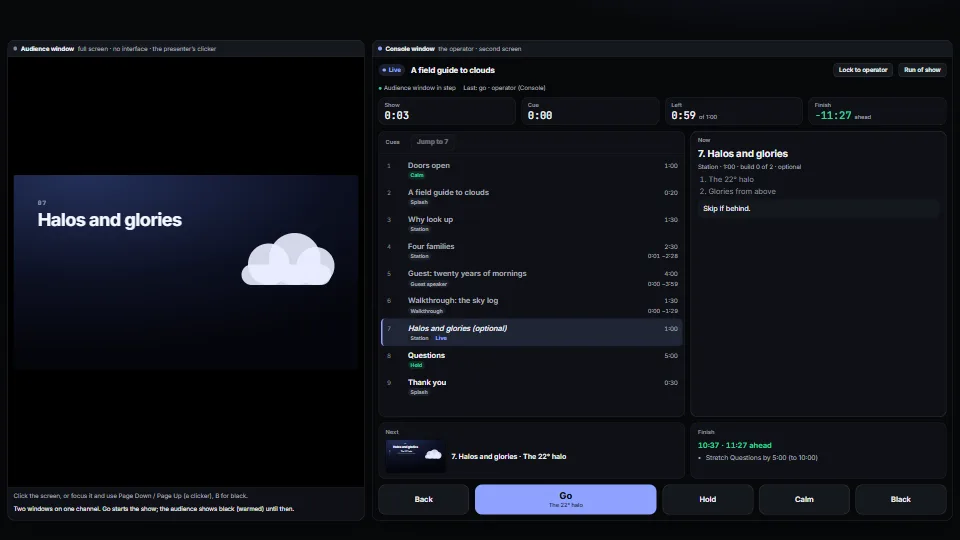
Cue engine and operator console
Runs a live presentation from a cue list: go, back, jump, hold, calm and black, with builds inside a cue, from any clicker, the keyboard or the console.
<0.01 CPU ms
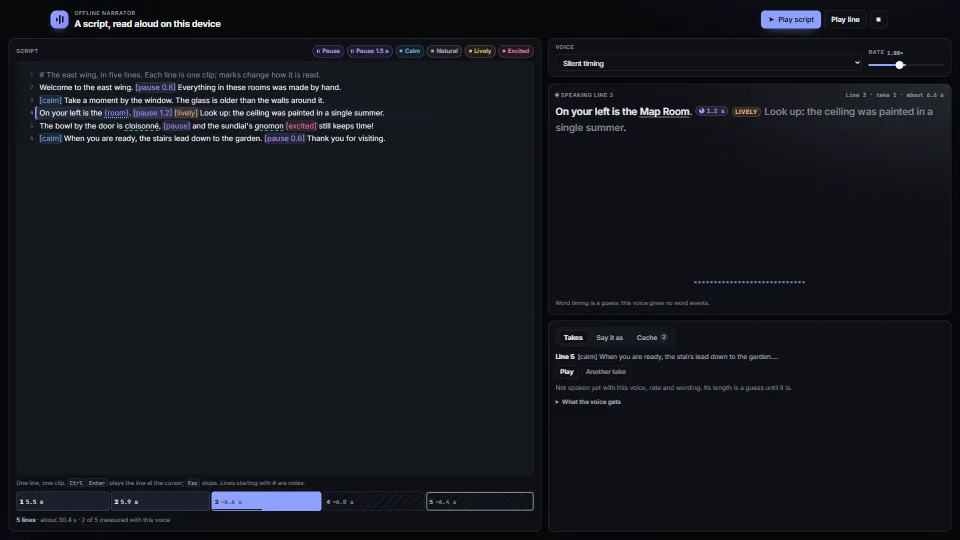
Narration from a script with no cloud: lines with pauses and tone marks, a pronunciation list and {values}, parsed into pieces that keep their place in the…
Measured 11 November 2026 on 13th Gen Intel(R) Core(TM) i9-13900H, Chrome 157, 1920×1080 at 1×. 600 frames × 3 rounds, median kept. What ran: Measured with the demo exercising itself: the five-line script plays on a loop through the silent timing engine (the bench has no click, so the system voice may not speak), with the word pill moving in the editor and the reading view, the ribbon pulsing on each word, the pause rings and the timeline playhead. Parsing and highlighting run on each edit, not each frame. Phones: tiers are being measured next.
| Machine | GPU ms | CPU ms | CPU p95 |
|---|---|---|---|
| unknown GPU · 13th Gen Intel(R) Core(TM) i9-13900Hreference · measuring tool | not timed | <0.01 | <0.01 |
| apple · Apple A19 Proin a browser tab · 16 November 2026 | not timed | <0.01 | <0.01 |
| Intel Arc 140V (Xe2-LPG) · Intel Core Ultra 7 258Vin a browser tab · 15 November 2026 | not timed | <0.01 | <0.01 |
Bars against one 16.7 ms frame. A browser-tab run is timed in a visible tab without the tool’s scripted input, so read it as close, not exact.
From My other apps. Fully custom code.
Web Speech API (W3C Community Group): speechSynthesis, its voices (localService marks the ones on the device) and the word boundary events
Kokoro-82M (hexgrad), Apache 2.0: the CPU engine; run through kokoro-js (Apache 2.0) and Transformers.js. Not included: downloaded by you, once
Chatterbox (Resemble AI), MIT: the GPU engine and its voice copying, run by chatterbox_worker.py. Not included: installed by you, once
pyloudnorm (Christian Steinmetz), MIT: the worker levels every clip to −18 LUFS (ITU-R BS.1770 loudness)
FNV-1a hash (Fowler, Noll, Vo), public domain: the 64-bit clip names, written here from the published constants
George Marsaglia, “Xorshift RNGs” (2003): the small generator behind each take’s pitch and pace
WAI-ARIA Authoring Practices Guide (W3C): the tabs, radio group and toolbar patterns in the demo
Systems & toolingRuns a live presentation from a cue list: go, back, jump, hold, calm and black, with builds inside a cue, from any clicker, the keyboard or the console.
 Systems & tooling
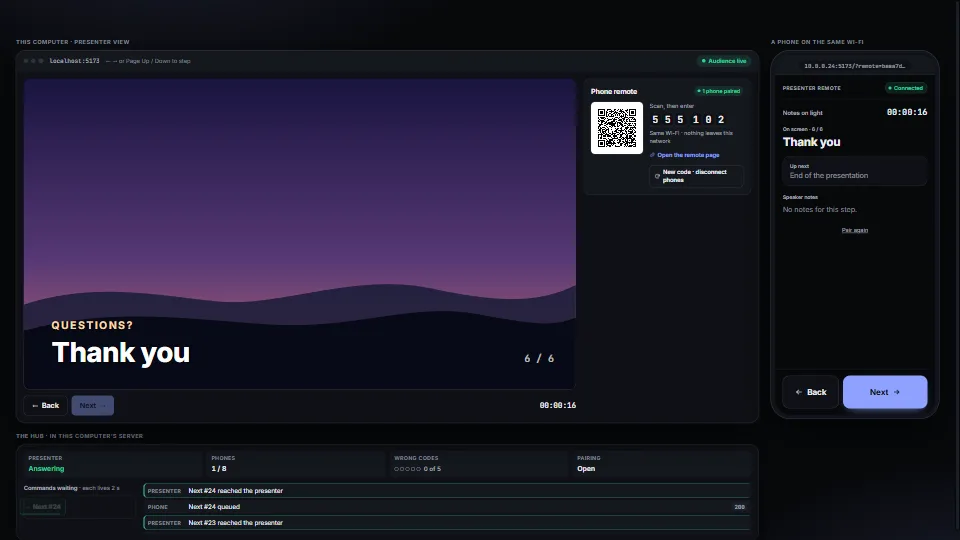
A phone on the same Wi-Fi steps a presentation, with no cloud and no app: scan a QR code, type a six-digit code, and Next and Back go to the presenting machine.
 Systems & tooling
 Systems & tooling