Units that carry through arithmetic, and goal seek
1.57 CPU ms
Still
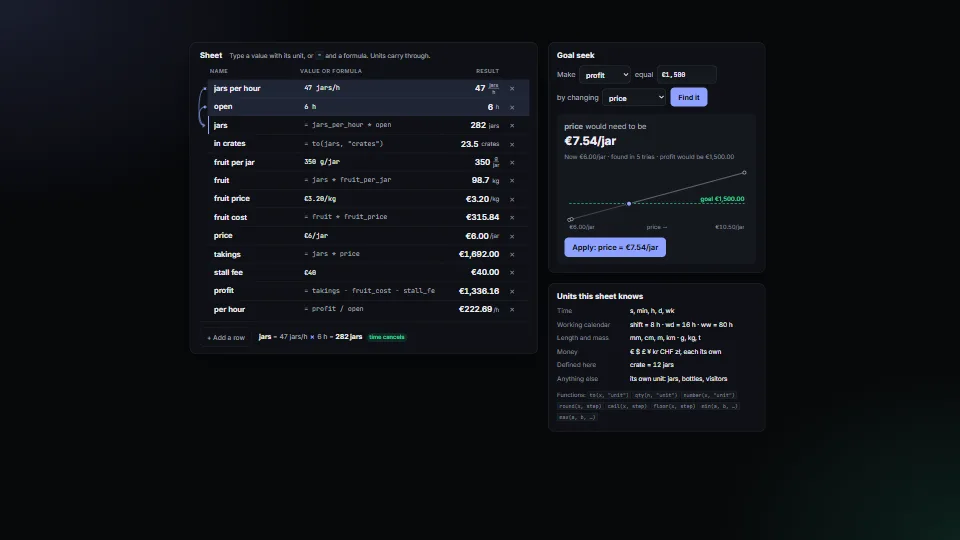
The live demo starts when it’s in view.Edit any value or formula · focus a row to see what it reads and what cancels · ask the goal seek on the right, then Apply
Numbers that keep their units through every step.
What it costs a frame
CPU
1.57 ms
02468101216.7 ms
GPU
not used
CPU, median
1.57 ms
CPU, 95th pct
2.08 ms
Draw calls
0
Weight
Moderate
Measured 13 November 2026 on RTX 4060 Laptop, 13th Gen Intel(R) Core(TM) i9-13900H, Chrome 157, 1920×1080 at 1×. 600 frames × 3 rounds, median kept (rounds ranged CPU 1.52–1.61 ms). What ran: Measured with the sheet editing itself: every frame it types a new rate into “jars per hour” (40, 41, … 49), so each frame reads the entry, works the whole sheet out again (13 rows, units carried through every step) and repaints the results, the unit fractions and the explanation. Nothing runs while nothing is typed. Phones: tiers are being measured next.
apple · Apple A19 Proin a browser tab · 16 November 2026
not timed
4.42
4.86
Intel Arc 140V (Xe2-LPG) · Intel Core Ultra 7 258Vin a browser tab · 15 November 2026
not timed
2.73
3.59
Bars against one 16.7 ms frame. A browser-tab run is timed in a visible tab without the tool’s scripted input, so read it as close, not exact.
What it needs
Renders with
DOM and CSSPlain DOM and CSS: every current browser.
Your browser
Runs hereNo WebGPU needed
Depends on
NothingNo other packages
What it’s for
Calculators and estimators where people type “120 jars/h” or “€3.20/kg”
Planning sheets: rates × time, cost per unit, totals per week
Catching unit mistakes before they become wrong numbers
Showing rates per hour, shift, working day or week
Answering “what price would make this profit?” (goal seek)
Formula fields in a no-code tool or a board app
Pitfalls, in brief
A quantity is stored in base units (2 h is 7200, written “h”): read what people see with shown(q) or formatQty(q), never q.n.
Any word that is not a known unit becomes a dimension of its own (“jars”, “bottles”): a typo such as “hors” is a new unit, not an error, and then fails to add to hours.
Plurals are folded only by a trailing s (“jars” = “jar”, but not “boxes” = “box”, and “glass” stays “glass”).
Each currency is its own dimension, so € + $ is refused rather than converted at a rate nobody set.
In a formula, only known units follow a number (“30 min”, “1 shift”); a custom unit needs qty(30, "jars"), or the word is read as a row name.
7 more in brief
Labels are kept as written: “hours” stays “hours”, “eur” stays “eur” (not “€”).
The calendar (shift, wd, ww, mo, yr) lives in the unit table: change it, and make a new table; reuse one table for all the rows of a sheet so they agree.
Goal seek works out the whole sheet once a try (up to 80): keep sheets small or the function cheap, and run it on a click, not on every keystroke.
Messages quote what people typed.
Typing always reads a point as the decimal mark (“1,500” is fifteen hundred), whatever the display writes: with a decimal comma shown (1 234,50), say so by the field, or turn the comma into a point before readQuantity.
compare (and so min, max and the step check of round) counts two quantities as equal when they differ by less than 1e-9 in base units (a billionth of the value above 1): below a microgram, a nanometre or a nanosecond, values are not told apart.
round, ceil and floor snap to 12 significant figures before rounding (so floor(€0.30, €0.10) is €0.30, not €0.20); a step finer than that relative to the value is not kept.
12 pitfalls in full, the hook-up guide, the module source and its tests come with the part.
Where it comes from
From SpaciousPro. Fully custom code.
The secant method and bisection (bracketed root finding): Goal seek brackets the target, then narrows with secant steps, halving every third step and whenever a secant step would leave the bracket. Textbook numerical methods; the code is the owner’s.
 Data & layout
 Data & layout
 Data & layout
 Data & layout