An ingest job looks simple: watch a folder, read each file, write a row. Then a file arrives twice under two names, the spreadsheet is open on someone’s screen, the synced folder is half downloaded, the destination was moved on Friday, and a second PC starts doing the same job. Each of those can write a record twice, or lose one. Counting something twice is worse than failing loudly: nobody notices until the totals are wrong.
These rules come from an ingest tool that reads fixed-layout documents from a watched, cloud-synced folder and appends one row per document to a workbook, on one or two office PCs. Each rule below is there because the tool met the case it guards against. Those marked always protect people’s records and hold; the defaults are where to start, and you may break one when you can say why; ideas are suggestions. The library’s field rules decide whether a record can be written, and its review queue is where the rest wait for a person.
Before you start
- (default) Every file is known by a hash of its bytes, never by its name or path.
- (default) Every record has a key of its own (a receipt number, an order id), checked against everything already written before anything is written.
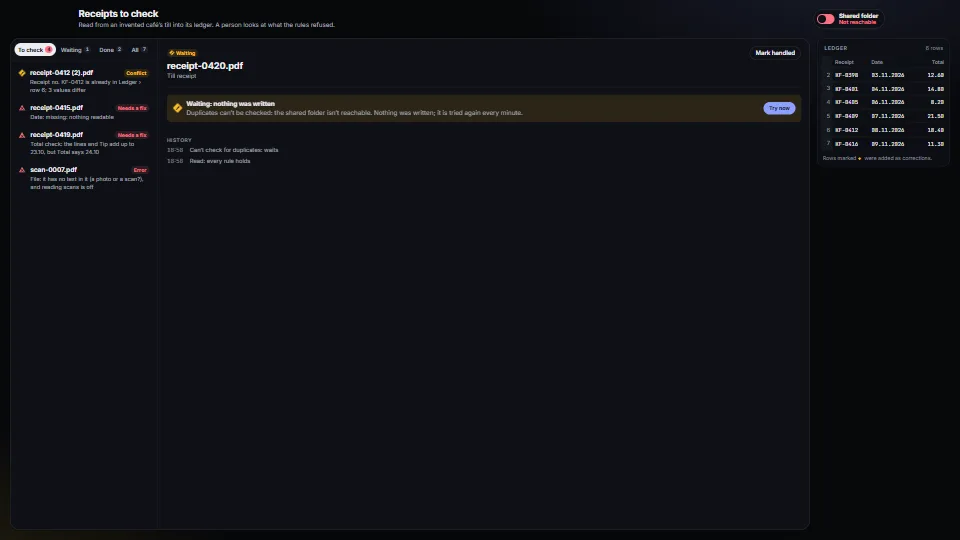
- (default) When the duplicate check can’t run, nothing is written: the item waits and is tried again.
- (default) The job keeps its own record of every row it wrote, and checks that as well as the destination.
- (default) Files are found by polling, and taken only once they have been non-empty and unchanged for 3 seconds.
- (default) A folder someone chose that has gone missing is reported, never created again empty.
- (default) One worker writes, and a file that fails is marked as failed while the worker carries on.
- (default) Every decision is appended to a log a person can read without the app, and nothing ever rewrites it.
- (default) Two machines that share a synced folder each append only to their own file in it.
- (default) Whatever needs a decision goes to a review queue with its reason, and is never guessed.
Two kinds of duplicate
They look alike and need different answers:
| What arrived | How it is found | What happens |
|---|---|---|
| The same file again (a copy, a resend, a rename) | the hash of its bytes | skipped quietly, and logged |
| The same record in another file (a corrected copy, a scan of the paper) | its key, against everything written | the same values: skipped (or sent to a person, by rule); other values: a conflict for a person |
A conflict is never settled by the job. A person sees the old row against the new one and keeps the old row, replaces it, or adds the new one as a marked correction, as in the review queue. Each choice says what it will do, and Replace is offered only while the old row is still where it was.
Know each file by its content
Names change (scan (2).pdf), paths change (files move to an archive), and the same file arrives by mail and by the folder. Hash the bytes and remember every hash with what happened to it:
import { createHash } from 'node:crypto';
import { readFile } from 'node:fs/promises';

const hashOf = async (path: string) => createHash('sha256').update(await readFile(path)).digest('hex');

async function submit(path: string) {
  const sha = await hashOf(path);
  const before = record.get(sha);
  if (before && ['queued', 'processing', 'waiting'].includes(before.status)) return; // in line already
  if (before && before.status !== 'error') return log('skip', `${path}: this exact file was already processed (${before.status})`, sha);
  record.set(sha, { status: 'queued', path });
  queue.push(sha);
}
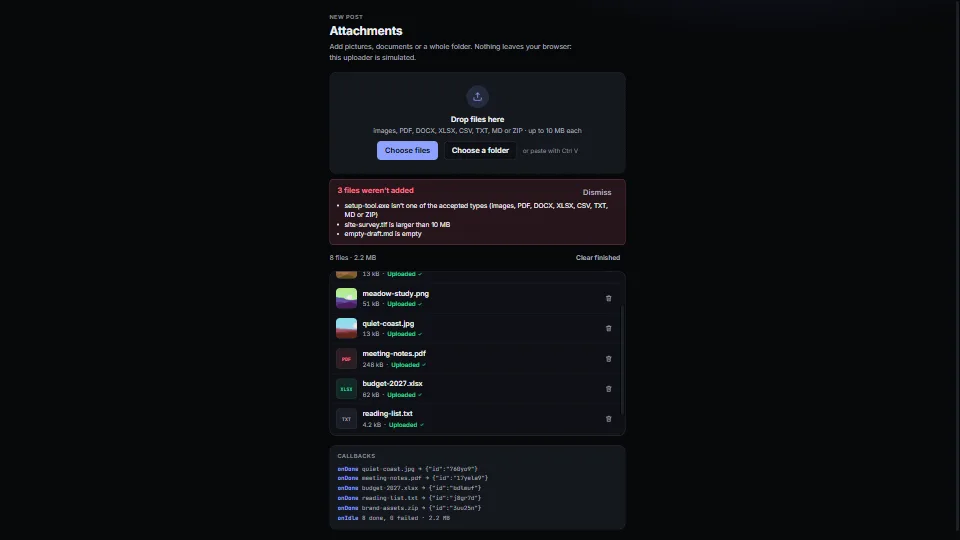
In a browser, file drop does the same before upload, hashing big files in slices. The server hashes them again: a hash the client sends is a hint, not proof.
Tried on the ingest tool. Deleting a row by hand in the workbook used to make it forget the file, so the next scan wrote it again. Now it remembers every file by its hash, whatever happens to the workbook, and Reprocess is the only way to write a file again on purpose. Reprocess is refused while the file’s row is still there: it would add it twice.
Never write blind
The duplicate check has three answers, not two: found, not found, and can’t tell. A destination that can’t be read (moved, unplugged, still syncing, locked) is not “not there”. Make “can’t tell” its own error, and let the item wait:
class CannotCheck extends Error {}

function existing(key: string): Row | null {
  for (const file of destinationFiles()) {
    let index: Map<string, Row>;
    try {
      index = readKeys(file);
    } catch (e) {
      throw new CannotCheck(`can’t read ${file.name} to check for duplicates (${(e as Error).message})`);
    }
    const hit = index.get(key);
    if (hit) return hit;
  }
  return null;
}

function decide(item: Item) {
  let old: Row | null;
  try {
    old = existing(item.key);
  } catch (e) {
    if (e instanceof CannotCheck) return wait(item, `${e.message}: nothing was written`); // tried again every minute
    throw e;
  }
  // …skip, conflict, or write
}
The waiting item stays where it is: it isn’t moved, archived or half written. It is tried again every minute and on Try now, and the queue says why it waits. A person fixing values by hand gets the error at once instead, because they are there to act on it.
Tried on the ingest tool. Its duplicate check once skipped a workbook it couldn’t read, as if the record weren’t there, and that is how a record got a second row. Now an unreadable workbook, an unreachable output folder and an unreadable shared folder all mean the same thing: wait. The rule is written beside the check, so nobody “simplifies” it back.
Keep your own record
The destination is not a memory. Spreadsheets get cut off weekly, renamed and moved, and people delete rows. So check, in this order, and stop at the first hit:
- The destination, every file it is split into (one per month, say), not only the current one.
- Rows waiting to be written (the file was locked, or another PC is writing them).
- The job’s own record of every row it wrote, with the row’s values as written.
- The other PCs’ records, if there are any (see the last section).
Keep the values of each row as written, not just its key, so a conflict can still be shown side by side after the destination has moved on. When a newer file replaces a row, mark the older record as replaced, so it no longer counts.
Tried on the ingest tool. Its workbook can be cut off weekly or monthly, renamed or moved. While the workbook was its only memory, any of those let a record in twice. With its own record, last week’s records still count after last week’s workbook has gone.
Wait for files to settle
Watch a folder by polling it, not with file-system events: on folders a cloud client syncs, events arrive late, twice or not at all. Take a file only once it is non-empty and hasn’t changed for 3 seconds, and if it can’t be read yet, leave it for the next round:
import { readdir, stat } from 'node:fs/promises';
import { join } from 'node:path';

async function scan(inbox: string) {
  for (const name of (await readdir(inbox)).sort()) {
    const path = join(inbox, name);
    const s = await stat(path).catch(() => null);
    if (!s?.isFile() || s.size === 0 || Date.now() - s.mtimeMs < 3000) continue; // still arriving
    await submit(path).catch(() => {}); // locked by the sync client: next round
  }
}
setInterval(() => scan(inbox).catch(showFolderProblem), 10_000); // and on "Check now"
Tried on the ingest tool. It polls on purpose, every 10 seconds by default: on folders that OneDrive or SharePoint sync, file-system events proved unreliable. A file the sync client still holds fails to hash, and is simply taken on a later round.
Never recreate a missing folder
Create the default folders at the first start, and nothing else. A folder someone chose that is missing has moved, is on a drive that isn’t plugged in, or hasn’t synced yet. Creating it again, empty, hides that, and the next row starts a second workbook nobody knows about. Report it instead, at the top of the screen, with the path and a way to the settings.
One writer, and no file can stop it
- (default) One worker writes. Files go into one queue, and one worker takes them in turn, so two files never write the same destination at once. Adding a second worker for speed brings back every race this playbook removes.
- (default) One bad file can’t kill it. Each file is handled inside its own
try: an error marks that file as failed, with its message, and the worker goes on to the next. - (always) A locked destination is a wait, not a failure. When the sheet is open in someone’s spreadsheet app, the row waits and is written as soon as it is closed. Replace the file atomically (write a copy, then rename it over the old one) so a crash never leaves half a file.
async function run() {
  for (;;) {
    const sha = await queue.take();
    try {
      await process(sha);
    } catch (e) {
      record.set(sha, { ...record.get(sha), status: 'error', problems: [{ label: 'Error', message: String(e) }] });
      log('error', (e as Error).stack ?? String(e), sha); // and on to the next file
    }
  }
}
A log nobody can rewrite
Write every decision twice: to the job’s database, and as one JSON line appended to a plain text file that a person can open without the app. Never edit or trim it. When a total is questioned months later, that file is what says which document wrote which row, which were skipped and why, and who chose Replace.
{"ts":"2026-11-08T09:12:40","sha":"5c1e…","kind":"accepted","message":"receipt-0412.pdf → Ledger › row 6 (added)"}
{"ts":"2026-11-09T14:40:02","sha":"a90f…","kind":"conflict","message":"receipt-0412 (2).pdf: KF-0412 is already in row 6 with different values"}
{"ts":"2026-11-09T14:52:31","sha":"a90f…","kind":"replace","message":"receipt-0412 (2).pdf: replaces row 6 (chosen by hand)"}
For people who never open the app, a refused file also goes to a Rejects folder as a copy, with a short text note beside it saying what went wrong and what could be read.
Two PCs, one synced folder
When two machines run the same job, they must know what the other has done. A shared folder that a cloud client syncs can carry that, if no file in it ever has two writers:
- (default) One file per PC. Each appends one JSON line per decision to its own file in the shared folder (
register - <pc>.jsonl) and reads everyone’s. With one writer per file, the sync client never makes conflict copies. - (default) The latest line wins, per item, by its timestamp. A line that doesn’t parse is a half-synced last line: skip it, and it is whole on the next read.
- (default) One PC writes the destination. The other hands its rows over through its own file; the writer checks for duplicates once more, writes, and answers in its own file (written, or refused with the reason).
- (always) Offline is a backlog, not a loss. A line that can’t be appended goes to a local backlog and is delivered first on the next write, because a line dropped while offline is a record lost for good.
- (default) Unreadable is “can’t tell”. A shared folder that is set but can’t be read raises
CannotCheck, and items wait, as above.
// Every PC's lines, the newest per item. Re-read a file only when its size or time changed.
function latest(lines: Line[]): Map<string, Line> {
  const out = new Map<string, Line>();
  for (const l of lines) if (!out.has(l.sha) || l.at >= out.get(l.sha)!.at) out.set(l.sha, l);
  return out;
}
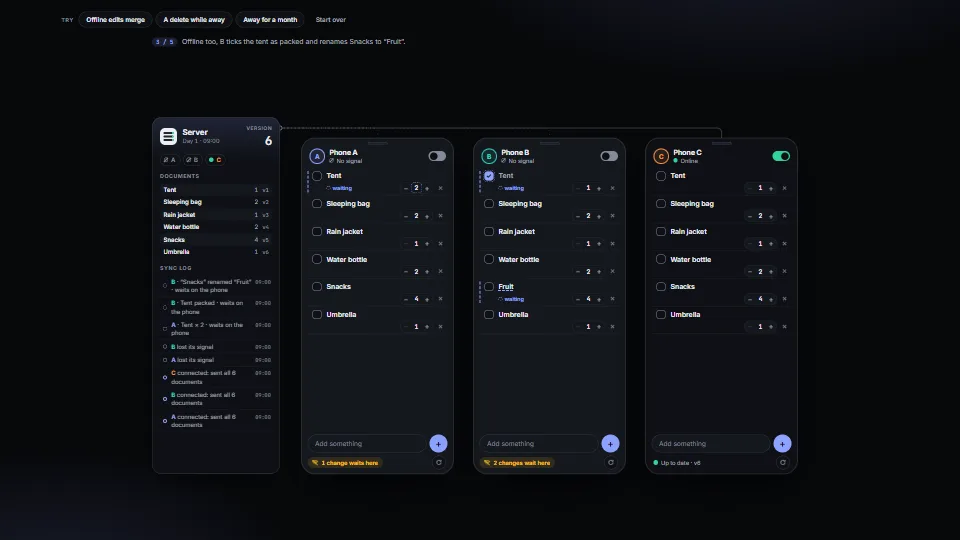
This is the low-tech version of a sync service. With a server, the offline sync entry does the same job properly: a queue of pending changes, catch-up by version, and the server deciding who did what.
Try to break it
Before trusting an ingest job, do each of these on purpose and check the destination afterwards:
- (default) Drop the same file twice under two names: one row.
- (default) Drop a copy with one value changed: a conflict, with that value marked.
- (default) Rename or unplug the destination folder, then drop a file: it waits, and goes through when the folder is back.
- (always) Open the destination in its app, then drop a file: it waits, and is written when the file is closed; a row lost here is someone’s work lost.
- (default) Copy a large file slowly into the inbox: it is taken once, after it has finished.
- (default) Drop a broken file among good ones: it is marked as failed, and the others are written.
- (default) Delete a written row by hand and drop its file again: it is skipped, and Reprocess writes it.
- (default) Take both PCs offline, drop files on each, bring them back: every file once, and no conflict copies in the shared folder.
As of November 2026, OneDrive and SharePoint sync on Windows keep both versions when two machines change one file between syncs, as a second copy named after the PC, and a file can be seen in the folder before it has finished arriving. Both are why the rules above use one file per PC and a settling time.
Parts that show it
 UI & interaction
Review queue with a side-by-side conflict
Where everything a person must look at waits, with the reason in plain words and what can be done.
 Data & layout
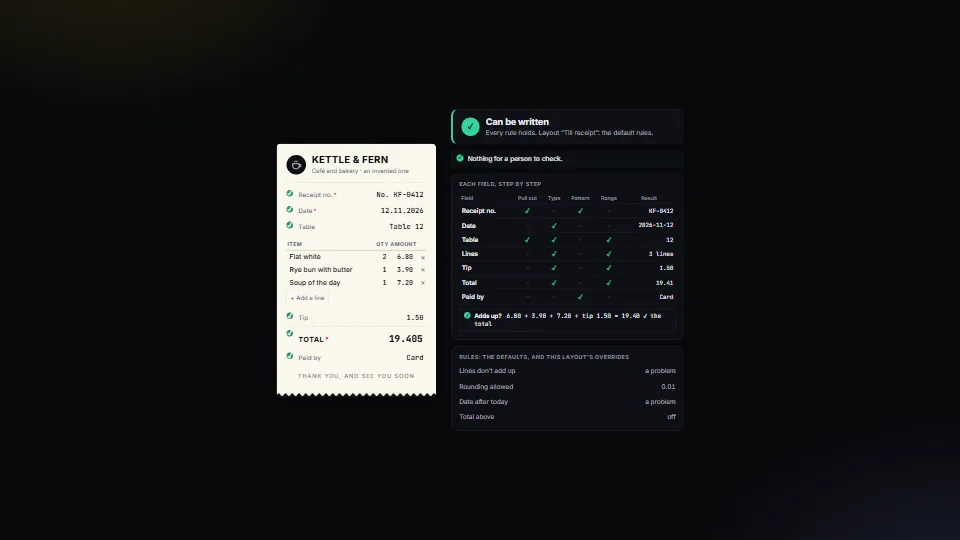
Field rules: when a person must check
Decides, for every value read from a document or a form, whether it can be written or a person must look, and says why in plain English.
 UI & interaction
File drop and upload list
A drop zone with a real button, folders walked, paste from the clipboard, and checks by type, size, count and duplicates (by content.
 Systems & tooling