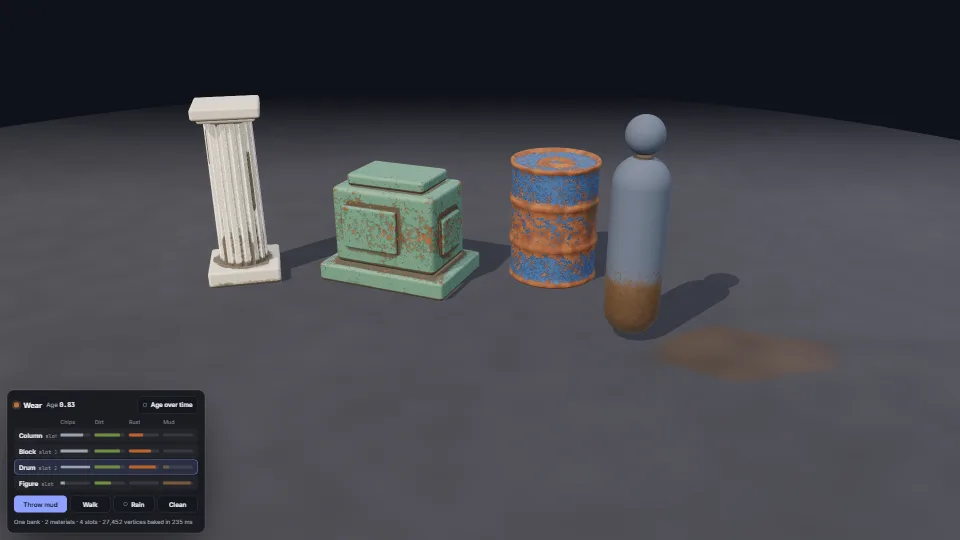
The live demo starts when it’s in view.Click a thing to throw mud at it · drag to orbit · the card picks a thing for the keyboard
Paint that wears through on edges and corners, dirt and rust that gather in crevices, and grime the world leaves.
What it costs a frame
GPU
0.94 ms
CPU
0.45 ms
02468101216.7 ms
GPU
0.94 ms
CPU, median
0.45 ms
CPU, 95th pct
0.74 ms
Draw calls
11
Weight
Moderate
Measured 13 November 2026 on RTX 4060 Laptop, 13th Gen Intel(R) Core(TM) i9-13900H, Chrome 157, 1920×1080 at 1×. 600 frames × 3 rounds, median kept (rounds ranged GPU 0.94–1.20, CPU 0.30–0.55 ms). What ran: Measured with four things (2,600 to 13,000 vertices each) drawn by two taught materials from one wear bank, ageing by itself in a 30 s loop and the figure walking through the puddle (grime stepped ten times a second, packed and uploaded); a 2048² key-light shadow map and a room environment. Each lit pixel reads the triplanar wear noise six times. Phones: tiers are being measured next.
apple · Apple A19 Proin a browser tab · 16 November 2026
4.85
0.52
0.72
Intel Arc 140V (Xe2-LPG) · Intel Core Ultra 7 258Vin a browser tab · 15 November 2026
6.55
0.99
1.48
Bars against one 16.7 ms frame. A browser-tab run is timed in a visible tab without the tool’s scripted input, so read it as close, not exact.
What it needs
Renders with
WebGPU or WebGLWebGPU where there is one, WebGL2 where there is not.
Your browser
Runs hereNo WebGPU needed
Depends on
three.js 0.187.0No other packages
What it’s for
Vehicles, props and machines that look used, and get more used as play goes on
A level whose things age with its story: new at the start, worn by the end
Characters whose clothes take mud from the ground and lose it in the rain
Many worn things on screen at once without a material each
Checking where a model’s edges and crevices are before texturing it
A quick weathered look for generated or kitbashed models that have no hand-painted textures
Pitfalls, in brief
The bake lives in the vertices, so a mesh needs vertices where the wear goes: a box of eight corners has nowhere to put a worn edge, and its faces fade from edge to edge.
Weld before measuring.
Fill the voxel copy solid before marching rays through it.
Start each ray about one and a half voxels off the surface, and keep it at least 8° up from the face: from the surface itself, every ray strikes its own voxel, and a grazing ray strikes the next step of the voxel stair.
Every mesh drawn with a taught material needs the wear attribute: three warns and reads zeros where it is missing, and the shader for that geometry is a different one.
5 more in brief
Read the wear on the model at rest (positionGeometry, normalGeometry), never where it is posed: a skinned part bending or turning slides through its own dirt.
Vertex colours multiply after a node material’s colour, so dirt over a dark paint comes out darker still.
Write wear into the slot, never into the material: changing a uniform or a define per thing would mean a material per thing and a pipeline each.
Without WebGPU, make the bank with textures: WearBank.needsTextures(renderer) (after renderer.init()).
Bake once, when the mesh is made or loaded (tens of milliseconds for ten thousand vertices): not in a frame.
10 pitfalls in full, the hook-up guide, the module source and its tests come with the part.
 Surfaces & materials
 Surfaces & materials
 Surfaces & materials
 Surfaces & materials