The live demo starts when it’s in view.Move the pointer to tilt the panels · hover or Tab to lift one
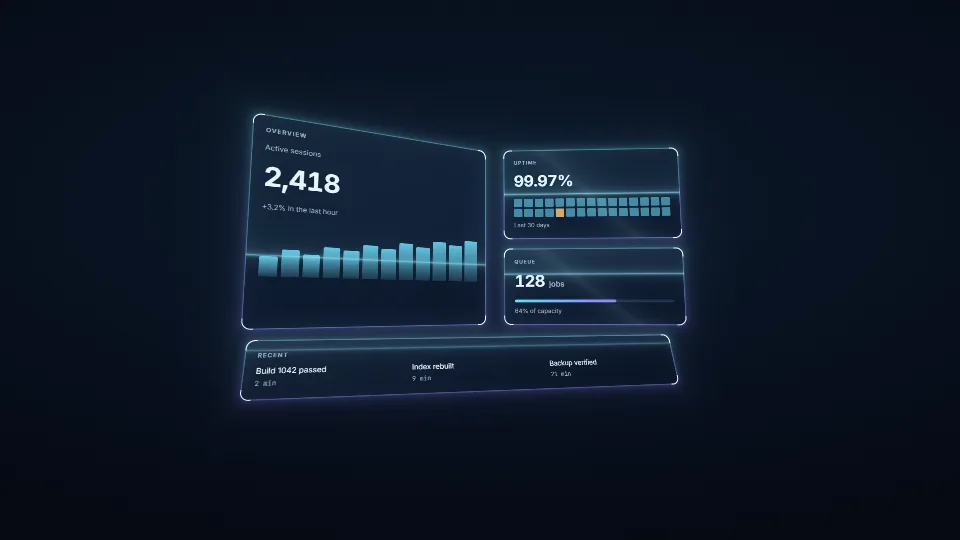
WebGPU drawing (WebGL2 where it is missing) that stays locked to DOM panels tilted in CSS 3D.
What it costs a frame
GPU
0.07 ms
CPU
0.27 ms
02468101216.7 ms
GPU
0.07 ms
CPU, median
0.27 ms
CPU, 95th pct
0.37 ms
Draw calls
0
Weight
Light
Measured 11 November 2026 on 13th Gen Intel(R) Core(TM) i9-13900H, Chrome 157, 1920×1080 at 1×. 600 frames × 3 rounds, median kept. What ran: Measured with the panels swinging by themselves and a scan running: four panels’ corner probes read each frame and one instanced draw of four quads, timed with its own timestamp queries. Phones: tiers are being measured next.
apple · Apple A19 Proin a browser tab · 16 November 2026
4.71
0.82
0.96
Intel Arc 140V (Xe2-LPG) · Intel Core Ultra 7 258Vin a browser tab · 15 November 2026
0.13
0.44
0.71
Bars against one 16.7 ms frame. A browser-tab run is timed in a visible tab without the tool’s scripted input, so read it as close, not exact.
How steadily it runs on Intel Arc 140V (Xe2-LPG) · Intel Core Ultra 7 258V · in a browser tab
Typical frame ?
16.66 ms
1% low ?
56 fps
Varies by ?
±0.40 ms
All metricsIntel Arc 140V (Xe2-LPG) · Intel Core Ultra 7 258V · in a browser tabHow long each frame took. Most frames sit in the tall bars; a long tail to the right is hitching.
Frames run on a 60 Hz timer (a page demo), so most frames take about one tick, 16.7 ms: the spread around it is what matters.
Frames
Median (p50) ?
16.66 ms
p95 ?
17.50 ms
p99 ?
17.98 ms
Slowest ?
18.18 ms
Mean ?
16.71 ms
Standard deviation ?
0.40 ms
1% low ?
56 fps
0.1% low ?
55 fps
Hitches ?
0 of 600
Over budget ?
0 of 600
Main thread
Long tasks ?
0
Long frames ?
0
Event-loop delay ?
0.1 / 0.9 / 0.9 ms
Input
No input during this run. A browser-tab run plays none.
Memory
JavaScript heap ?
68.5 → 69.0 MB
Growth ?
+0.50 MB
What it needs
Renders with
WebGPU or WebGLWebGPU where there is one, WebGL2 where there is not.
Your browser
Runs hereNo WebGPU needed
Depends on
NothingNo other packages
What it’s for
Spatial and holographic interfaces
Tilting cards and hero panels
Game menus and HUDs
Dashboards with depth
Highlighting DOM in 3D product tours
Pitfalls, in brief
A probe is a point only while it has no size: keep the probes’ width and height at 0, and do not let a page style (padding, borders) give them one.
Reading a rect forces style and layout: write every transform first, then read once a frame.
The tracker reads only when something can have moved.
An animation with fill: forwards stays in getAnimations(): the tracker then reads every frame (cheap, but it never rests).
A panel turned past 90°, or with a corner behind the viewer, gives a quad the homography cannot use: it is skipped.
3 more in brief
overflow: hidden, opacity < 1, filter or backdrop-filter on an ancestor between the perspective and the panels flattens the 3D: the probes still report the truth, but it is no longer the look you meant.
The light is added over the panels (additive, premultiplied): it reads on dark backgrounds and fades on light ones.
Without WebGPU the light is drawn with WebGL2 from quad-glsl.ts, a line-for-line twin of the WGSL (the quads as instanced attributes in place of the uniform array): change one shader and change the other.
8 pitfalls in full, the hook-up guide, the module source and its tests come with the part.
Where it comes from
From HaTac. Fully custom code.
Paul Heckbert, Fundamentals of Texture Mapping and Image Warping (1989): The closed-form square-to-quad homography in projective.ts follows his derivation.
Inigo Quilez, 2D distance functions: The rounded-box distance that shapes each panel’s rim follows his published formula, re-written in WGSL.
 Techniques
 Techniques
 Techniques
 Techniques