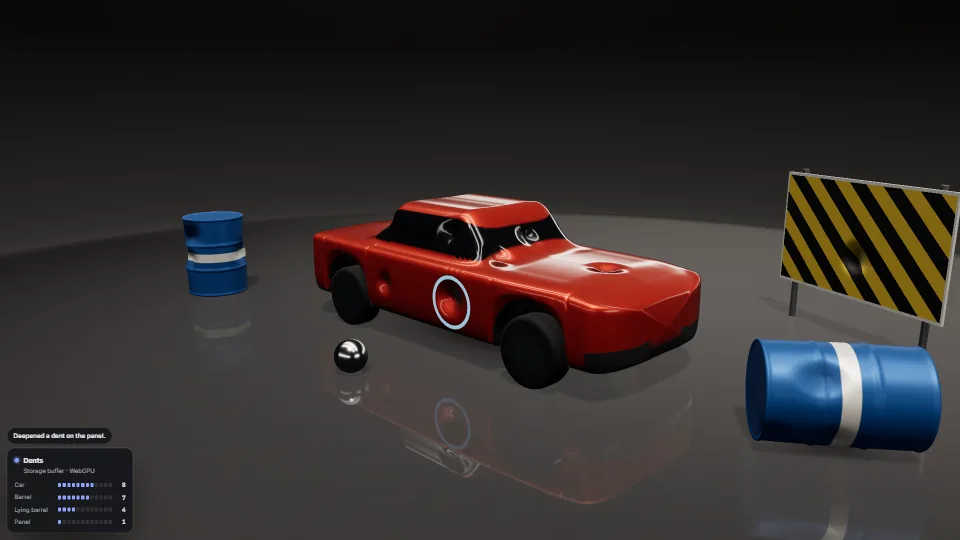
The live demo starts when it’s in view.Click the car, a barrel or the sign to dent it · click the floor to roll a ball through that spot · drag to orbit
Crash dents on car bodies, barrels, panels and props, drawn by the GPU from one small table of objects × dent slots.
What it costs a frame
GPU
1.01 ms
CPU
0.88 ms
02468101216.7 ms
GPU
1.01 ms
CPU, median
0.88 ms
CPU, 95th pct
1.50 ms
Draw calls
62
Weight
Moderate
Measured 13 November 2026 on RTX 4060 Laptop, 13th Gen Intel(R) Core(TM) i9-13900H, Chrome 157, 1920×1080 at 1×. 600 frames × 3 rounds, median kept (rounds ranged GPU 1.01–1.07, CPU 0.53–0.89 ms). What ran: Measured with nine dents placed ahead on all four things (so every dented mesh runs its loops per vertex and per pixel) and a ball rolled at something every 1.2 s, its dents popping in; a repair every 6 s. Shadows from one key light and a room environment. Standing still outside the bench, nothing is drawn at all. Phones: tiers are being measured next.
apple · Apple A19 Proin a browser tab · 16 November 2026
10.2
1.18
4.66
Intel Arc 140V (Xe2-LPG) · Intel Core Ultra 7 258Vin a browser tab · 15 November 2026
7.77
1.56
2.62
Bars against one 16.7 ms frame. A browser-tab run is timed in a visible tab without the tool’s scripted input, so read it as close, not exact.
How steadily it runs on Intel Arc 140V (Xe2-LPG) · Intel Core Ultra 7 258V · in a browser tab
Typical frame ?
13.42 ms
1% low ?
42 fps
Varies by ?
±2.61 ms
All metricsIntel Arc 140V (Xe2-LPG) · Intel Core Ultra 7 258V · in a browser tabHow long each frame took. Most frames sit in the tall bars; a long tail to the right is hitching.
Frames run back to back, each starting once the GPU has finished the last, so frame times show the work itself. They have a floor of about 4–5 ms from the browser’s own scheduling: GPU and CPU ms stay the measure of cost.
Frames
Median (p50) ?
13.42 ms
p95 ?
15.48 ms
p99 ?
16.28 ms
Slowest ?
39.87 ms
Mean ?
12.80 ms
Standard deviation ?
2.61 ms
1% low ?
42 fps
0.1% low ?
25 fps
Hitches ?
2 of 600
Over budget ?
5 of 600
Main thread
Long tasks ?
0
Long frames ?
0
Event-loop delay ?
0.1 / 2.8 / 3.4 ms
Input
No input during this run. A browser-tab run plays none.
Memory
JavaScript heap ?
96.0 → 89.8 MB
Growth ?
-6.22 MB
What it needs
Renders with
WebGPU or WebGLWebGPU where there is one, WebGL2 where there is not.
Your browser
Runs hereNo WebGPU needed
Depends on
three.js 0.187.0No other packages
What it’s for
Car crashes in a racing or driving game: dents where it hit, deeper with each knock
Props that take hits: barrels, bins, lockers, signs, doors, metal sheds
A ball, a ram or debris denting what it strikes, from the contact point and speed
Repairing damage over a second or two: a pit stop, a workshop, a reset
Many objects sharing one material, each with its own dents
Damage that must run on WebGL2 as well as WebGPU
Pitfalls, in brief
Wrap a material before it is first compiled, and never change it on the first dent: the loops sit behind a per-object test (slot ≥ 0), so the same shader serves undented and dented meshes and nothing recompiles mid-game.
The lean is what shows a dent on a big flat face: a panel of a few large triangles has no vertices to push.
A physical material with clearcoat shades its coat with its own normal (clearcoatNormalNode), which is the plain geometry normal by default: lean only the base normal and the glossy coat stays perfectly smooth over the dent. wrap leans both.
Dents live in each mesh’s own space, after skinning and morphs.
Storage buffers are WebGPU only, and a WebGPU device in compatibility mode may allow none in a vertex shader.
5 more in brief
Not a uniform array for WebGL2: 64 objects × 12 dents × 2 vec4s is 24 KB, over the 16 KB a uniform block is guaranteed.
The table is written in place and uploaded whole when its version changes (24 KB at the defaults): call update(dt) every frame, which also plays the pops and repairs.
Snap hits onto the undented surface (place, on by default): a contact box or a blast’s centre is often beside the hull, and a dent centred in the air dents nothing (the source’s widest vehicle missed by 0.45 m).
A dent is a sphere in the mesh’s own space: on a mesh scaled unevenly it stretches with the mesh.
The bounding sphere is not grown: dents push in, so the culling bounds still hold.
10 pitfalls in full, the hook-up guide, the module source and its tests come with the part.
GLB models ready for a stage: gated before loading (header, size and count budgets, allowed extensions, nothing outside the file, each refusal with a plain…
 Techniques
 Techniques
 Techniques
 Techniques